Field note · implementation
How to Build a Read-Only MCP Tool for an Internal Workflow
Build one bounded MCP read tool with typed inputs, tenant checks, output limits, structured errors, audit events, and misuse tests.

When an internal workflow needs one lookup, the first temptation is to expose a general database tool. That creates a larger boundary before you know whether the workflow needs one.
When I taught product managers to move from writing specifications to building and shipping products, the hard part was usually defining what done meant. For this tool, done means a valid read works and the obvious misuse cases fail in observable ways.
Here is the run result. The dependency-free fixture below used five synthetic rows and exposed one tool. The eight-case suite passed on 2026-08-23.
| Case | Observed result |
|---|---|
| Valid read | ok: true, 3 rows, 319-byte payload |
| Missing auth | AUTH_REQUIRED |
| Broad query | QUERY_TOO_BROAD |
| Injection-shaped literal OR 1=1 | ok: true, 0 rows |
| Malformed limit: 0 | INVALID_INPUT |
| Repeated read | Same returned rows |
| Write attempt | TOOL_NOT_FOUND |
| Disconnect | Clean input end |
The result is a public, reproducible artifact for a narrow build decision. It is not a production security certification.
Start with one operation, not a platform
Expose one read operation when the workflow has one known lookup, one data owner, and no current need to mutate records. Add another tool only after its authority, data scope, failure modes, and owner are explicit.
MCP standardizes a message model between hosts, clients, and servers, and it lets servers expose tools that an AI application can invoke. It does not decide which tenant a caller may read or whether your adapter should query a database at all. Those remain application decisions (MCP specification).
This is why the artifact has no execute_sql, search_everything, or generic HTTP tool. The server advertises only read_orders. The narrower surface makes the first test meaningful: did this caller receive the permitted rows and nothing else?
The choice changes when the real job is not a lookup. If the workflow needs writes, file access, outbound requests, or joins across systems, keep those capabilities in separate tools with separate policy and review. Do not smuggle them into a read tool through a flexible query string.
Define the contract before the adapter
Write the tool contract as a small policy table before connecting a real database. The model may propose status, query, and limit; it may not propose a tenant or role.
| Boundary | Fixture decision | Why it exists |
|---|---|---|
| Identity | id, tenant, and role come from request context | The model cannot choose its own authority |
| Roles | reader and analyst only | An explicit allowlist is reviewable |
| Inputs | status, literal query, integer limit | The tool has no query language |
| Rows | Maximum 3, reject broader matches | The caller cannot receive a hidden export |
| Payload | Maximum 1,600 bytes | A row cap does not guarantee a small response |
| Errors | Stable code, message, and details | Clients can branch without parsing prose |
| Audit | Request ID, actor, decision, reason, size | A reviewer can explain an allow or denial |
| Writes | No write tool and no mutation path | Read-only is enforced by capability inventory |
The input schema uses JSON Schema vocabulary such as type, enum, and numeric limits. JSON Schema defines these as validation assertions, while MCP tool definitions use an input schema to describe expected parameters (JSON Schema Validation, MCP tools). Schema validation is necessary, not sufficient. Application code still checks tenant ownership, role, result size, and business meaning.
Keep identity outside tool arguments
Derive the tenant from the authenticated request context. A request that says { "tenant": "bravo" } inside model-controlled arguments is not an authorization decision.
The complete fixture uses process context for its identity in stdio mode. A remote deployment would replace that boundary with its transport and authorization layer, while keeping the same application checks:
const PROTOCOL_VERSION = '2025-06-18';
const TOOL_NAME = 'read_orders';
const POLICY = { maxRows: 3, maxPayloadBytes: 1600, roles: ['reader', 'analyst'] };
const INPUT_SCHEMA = {
  type: 'object', additionalProperties: false,
  properties: {
    status: { type: 'string', enum: ['open', 'closed'] },
    query: { type: 'string', maxLength: 40 },
    limit: { type: 'integer', minimum: 1, maximum: 3 },
  },
};
const FIXTURE = [
  { id: 'o-101', tenant: 'acme', status: 'open', customer: 'Ada', summary: 'Renewal review' },
  { id: 'o-102', tenant: 'acme', status: 'open', customer: 'Lin', summary: 'Security questionnaire' },
  { id: 'o-103', tenant: 'acme', status: 'closed', customer: 'Mira', summary: 'Invoice correction' },
  { id: 'o-104', tenant: 'acme', status: 'open', customer: 'Noah', summary: 'Contract review' },
  { id: 'o-201', tenant: 'bravo', status: 'open', customer: 'Ravi', summary: 'Renewal review' },
];
const audit = [];
let requestNumber = 0;

function failure(code, message, details = {}) {
  return { ok: false, error: { code, message, details } };
}

function auditEvent(requestId, actor, decision, reason, extra = {}) {
  audit.push({ ts: '2026-08-23T10:00:00.000Z', requestId,
    actor: actor?.id ?? null, tool: TOOL_NAME, decision, reason, ...extra });
}

function validate(args) {
  if (!args || typeof args !== 'object' || Array.isArray(args))
    return failure('INVALID_INPUT', 'arguments must be an object');
  const unknown = Object.keys(args).filter((key) => !['status', 'query', 'limit'].includes(key));
  if (unknown.length) return failure('INVALID_INPUT', 'unknown input field', { fields: unknown });
  if (args.status !== undefined && !['open', 'closed'].includes(args.status))
    return failure('INVALID_INPUT', 'status is not allowed');
  if (args.query !== undefined && (typeof args.query !== 'string' || args.query.length > 40))
    return failure('INVALID_INPUT', 'query must be a string of 40 characters or fewer');
  const limit = args.limit ?? POLICY.maxRows;
  if (!Number.isInteger(limit) || limit < 1 || limit > POLICY.maxRows)
    return failure('INVALID_INPUT', 'limit must be an integer from 1 to 3');
  return { ok: true, value: { status: args.status, query: args.query?.toLowerCase(), limit } };
}

function readOrders(auth, args) {
  const requestId = `req-${++requestNumber}`;
  if (!auth?.id || !auth.tenant || !auth.role) {
    auditEvent(requestId, auth, 'deny', 'AUTH_REQUIRED');
    return failure('AUTH_REQUIRED', 'caller identity, tenant, and role are required', { requestId });
  }
  if (!POLICY.roles.includes(auth.role)) {
    auditEvent(requestId, auth, 'deny', 'ROLE_FORBIDDEN');
    return failure('ROLE_FORBIDDEN', 'role cannot call this tool', { requestId });
  }
  const checked = validate(args);
  if (!checked.ok) {
    auditEvent(requestId, auth, 'deny', checked.error.code);
    return { ...checked, error: { ...checked.error, details: { ...checked.error.details, requestId } } };
  }
  const { status, query, limit } = checked.value;
  const matches = FIXTURE.filter((row) => row.tenant === auth.tenant)
    .filter((row) => !status || row.status === status)
    .filter((row) => !query || `${row.customer} ${row.summary}`.toLowerCase().includes(query));
  if (matches.length > limit) {
    auditEvent(requestId, auth, 'deny', 'QUERY_TOO_BROAD', { matches: matches.length });
    return failure('QUERY_TOO_BROAD', 'add a narrower status or literal query', { requestId, matches, maxRows: limit });
  }
  const data = { rows: matches, count: matches.length, readOnly: true };
  const payloadBytes = Buffer.byteLength(JSON.stringify(data));
  if (payloadBytes > POLICY.maxPayloadBytes) {
    auditEvent(requestId, auth, 'deny', 'PAYLOAD_TOO_LARGE', { payloadBytes });
    return failure('PAYLOAD_TOO_LARGE', 'result exceeds the payload limit', { requestId, payloadBytes, maxPayloadBytes: POLICY.maxPayloadBytes });
  }
  auditEvent(requestId, auth, 'allow', 'READ', { rows: matches.length, payloadBytes });
  return { ok: true, data, meta: { requestId, payloadBytes } };
}
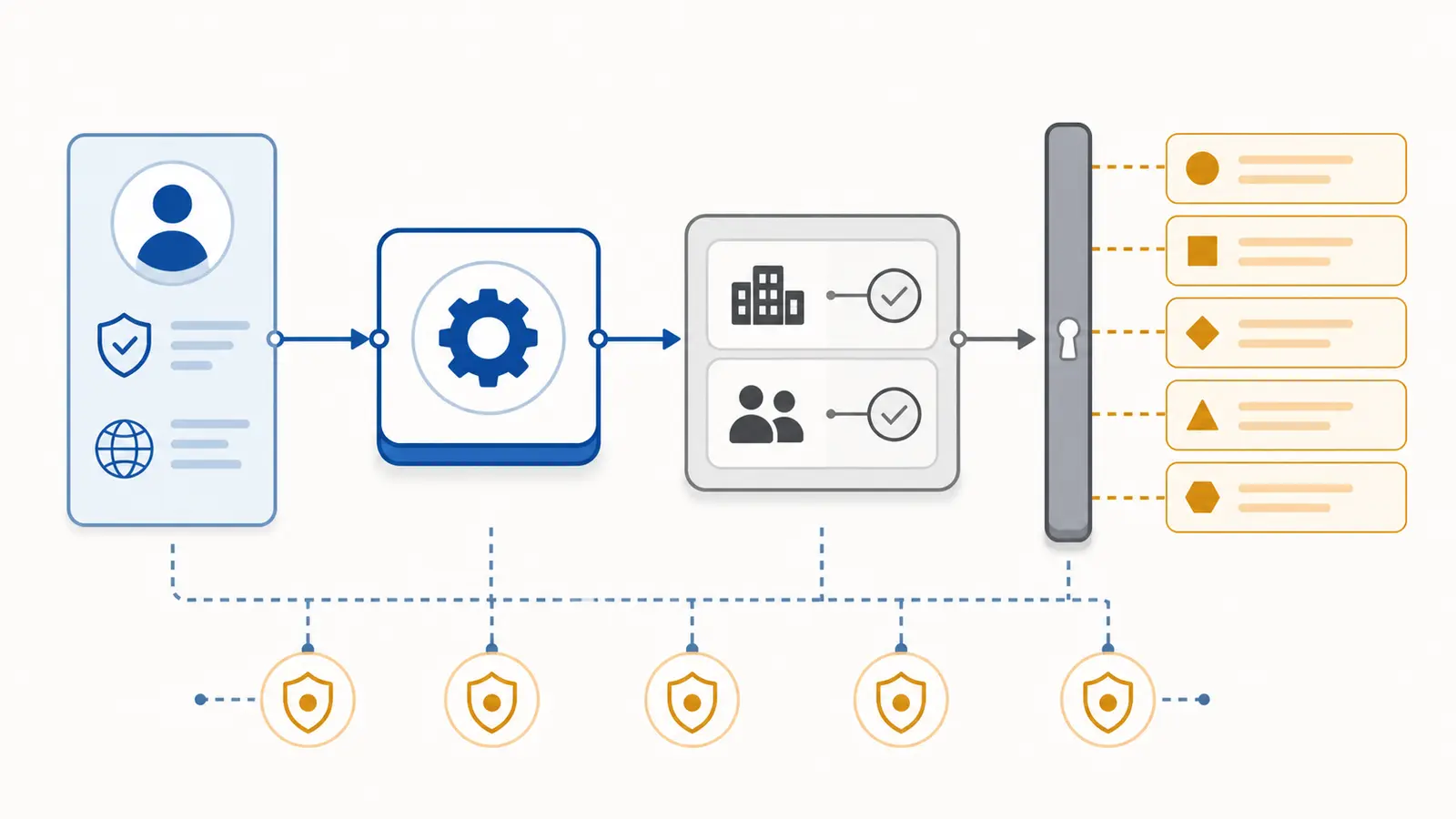
The important detail is the order. Authenticate, authorize, validate, filter by the server-owned tenant, reject broad matches, measure the serialized payload, then return. The model never gets a chance to widen the query after those checks.
Implement the MCP boundary as an allowlist
Expose the contract through initialize, tools/list, and tools/call. MCP tools are model-controlled in the protocol model, but the MCP tools guidance also says applications should keep a human able to deny invocations. The server still has to enforce its own authorization and data limits (MCP tools).
The adapter is deliberately boring:
function toolResult(value) {
  return {
    resultType: 'complete',
    isError: !value.ok,
    content: [{ type: 'text', text: JSON.stringify(value) }],
    structuredContent: value,
  };
}

function rpc(message, auth) {
  if (message.method === 'initialize') return {
    jsonrpc: '2.0', id: message.id,
    result: { protocolVersion: PROTOCOL_VERSION, capabilities: { tools: {} },
      serverInfo: { name: 'readonly-orders', version: '1.0.0' } },
  };
  if (message.method === 'notifications/initialized') return null;
  if (message.method === 'tools/list') return {
    jsonrpc: '2.0', id: message.id,
    result: { tools: [{ name: TOOL_NAME,
      description: 'Read bounded synthetic orders. This server has no write tools.',
      inputSchema: INPUT_SCHEMA,
      annotations: { readOnlyHint: true, destructiveHint: false } }] },
  };
  if (message.method === 'tools/call') {
    if (message.params?.name !== TOOL_NAME)
      return { jsonrpc: '2.0', id: message.id,
        result: toolResult(failure('TOOL_NOT_FOUND', 'only read_orders is exposed')) };
    return { jsonrpc: '2.0', id: message.id,
      result: toolResult(readOrders(auth, message.params.arguments)) };
  }
  return { jsonrpc: '2.0', id: message.id,
    error: { code: -32601, message: 'method not found' } };
}
The allowlist is the no-write guarantee in this fixture. tools/list exposes one tool, and a call to write_orders returns TOOL_NOT_FOUND. In a real server, repeat this check at the application route and downstream data service. A capability label alone is not an enforcement boundary.
Test failure before real data
Use a fixed fixture and record the output for each test. The test method is more useful than a claim that the tool is “safe.” OWASP describes its Top 10 as a broad awareness document, so use it to frame common risk categories, not as a certification for this server (OWASP Top 10).
Run these cases in order:
- Call
read_ordersasanalystin tenantacmewithstatus: "open"andlimit: 3. Expect three rows andreadOnly: true. - Remove the identity, tenant, and role. Expect
AUTH_REQUIRED. - Remove filters so four tenant rows match the cap. Expect
QUERY_TOO_BROAD, not a truncated list. - Send the literal query
OR 1=1. Expect zero rows. The fixture has no query language, so the string stays data. - Send
limit: 0or an unknown field. ExpectINVALID_INPUT. - Repeat the valid read. Expect the same rows and a new request ID.
- Call
write_orders. ExpectTOOL_NOT_FOUND. - Close the input stream while no request is pending. Expect a clean end and no exception.
The observed run passed all eight cases. It emitted six audit events for direct read calls, including the allow and denial reasons. The raw protocol run returned 2025-06-18, one tool, and a structured result. That is enough evidence to move from “the fixture behaves as designed” to “now adapt one boundary at a time.” It is not enough evidence to connect a production database without another review.
Adapt the fixture without losing the boundary
Replace the synthetic FIXTURE last. Keep the policy and test cases intact while changing the adapter.
The first adapter should accept a tenant already derived from identity, use a parameterized database query, select an explicit field list, enforce the row limit in the query, measure the serialized response, and preserve the same error codes. Add a cross-tenant fixture before real data so the authorization test still has a known negative case.
NIST's AI Risk Management Framework appendix emphasizes defining and differentiating human roles and responsibilities around AI decision-making and oversight. Give the read operation an owner who can answer what data it may expose, who may approve changes, and what the audit event is for (NIST Appendix C).
Keep the exception visible: a read-only tool can still disclose sensitive data, exhaust a backend, or return a misleading partial result. If the workflow needs a write, do not quietly add it here. Create a separate tool, policy, approval path, and misuse suite.
If you are building a broader product and need help choosing the next boundary, start with How to scope an AI agent proof of concept. For the adjacent security question, see How to secure an MCP server for AI agents, then compare the permission boundary in How to give an AI agent least-privilege access to tools. If the team gets stuck converting the fixture into a real workflow, work with Marius Manolachi on the build using the artifact and trace as the starting point.
Continue with a related field note
Questions people ask next
Is a read-only MCP tool safe by default?
No. Read-only access can still disclose another tenant’s records or an entire dataset. Keep identity, tenant, role, fields, row count, payload size, and downstream authorization inside the server, then test denial cases before using real data.
Should tenant ID be an MCP tool argument?
Not when the caller identity already determines the tenant. Derive tenant scope from authenticated request context and reject unknown input fields so the model cannot widen its own data boundary.
What should happen when a read query is too broad?
Return a stable structured error such as QUERY_TOO_BROAD and ask for a narrower filter. Do not silently truncate the result, because truncation can look like a complete answer.