Field note · architecture
When Should an AI Workflow Run Synchronously or Asynchronously?
A matched 40-job experiment shows when sync is cheaper and when async earns its queue, status, retry, and recovery complexity.
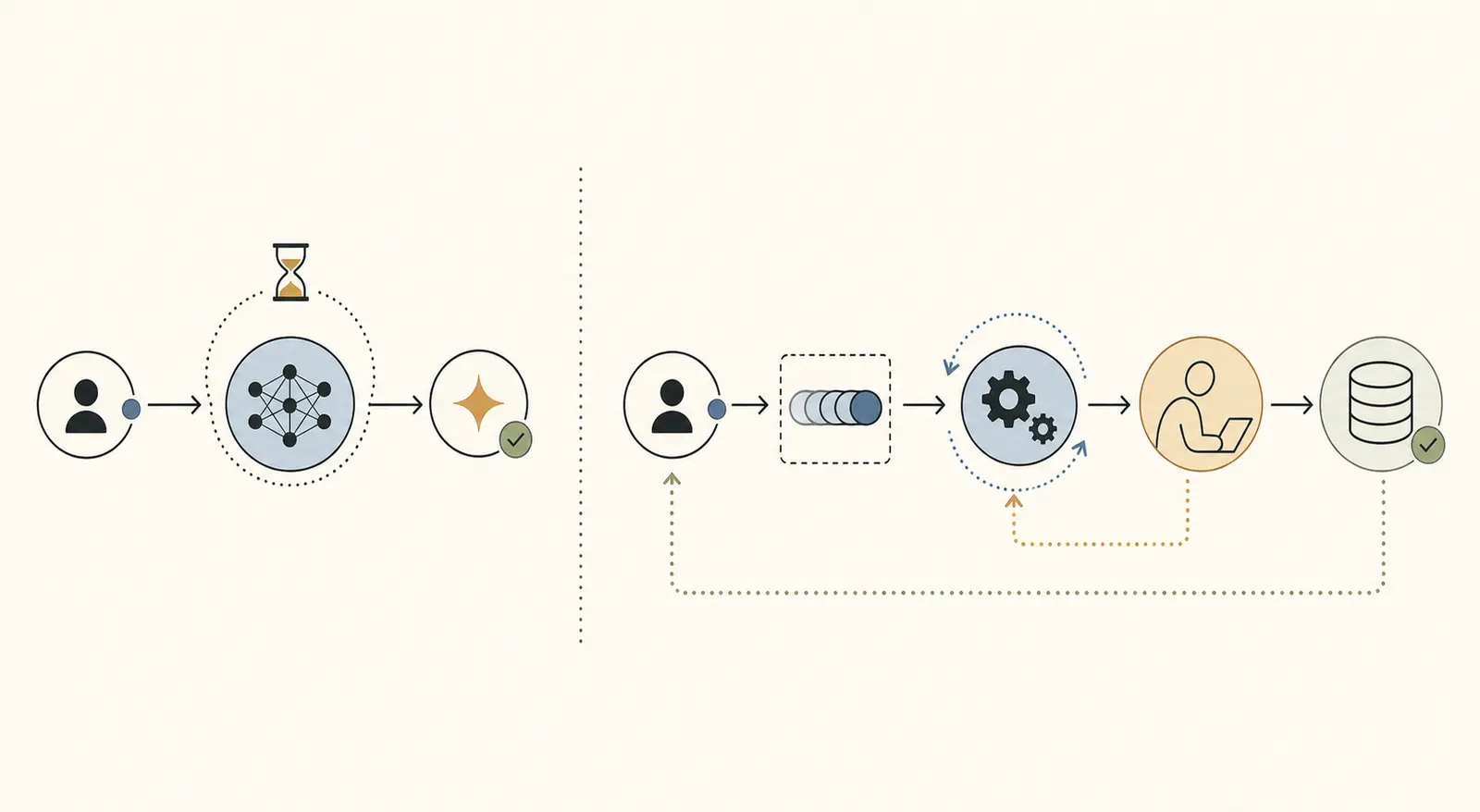
The tempting answer is “use a queue for anything serious.” The experiment below gives a more useful answer.
If the model and review step fit inside the request budget, a queue can add moving parts without improving the user-visible result. If they do not fit, keeping the request open turns a normal delay into a timeout, a retry, or an unknown outcome.
What did the matched experiment show?
The crossover was the request budget, not a vague idea of production maturity. In the fixture, sync and async behaved the same when 500 ms of model work had no review delay. When the model plus review took longer than the 2,000 ms synchronous budget, sync returned timeouts and async preserved a terminal result.
| Condition | Sync result | Async result | What changed |
|---|---|---|---|
| 500 ms model, 0 ms review, concurrency 4 | 100% success, p50/p95 2,500/5,000 ms, 42 cost units | 100% success, p50/p95 2,500/5,000 ms, 46 cost units | No user-visible benefit from the queue in this fixture |
| 500 ms model, 3,000 ms review, concurrency 4 | 0% success, 100% timeout, status quality 0% | 100% success, p50/p95 17,500/35,000 ms, status quality 100% | Async paid for its lifecycle and preserved completion |
| 3,500 ms model, 0 ms review, concurrency 4 | 0% success, 100% timeout, status quality 0% | 100% success, p50/p95 17,500/35,000 ms, status quality 100% | Async crossed the same boundary on model time alone |
| 500 ms model, 20% transient failure, one retry | 95% recovery, 8 repeated attempts, 50 cost units | 95% recovery, 8 repeated attempts, 54 cost units | Retry behavior matched; sync remained cheaper |
The p50 and p95 values are time from submitting the 40-job batch, not just model service time. A timeout appears fast in a latency table because the request stopped waiting. That is why success, recovery, and status quality sit beside latency in the result.
This is the sourceable result of the page: under a 2,000 ms request budget, the matched fixture crossed from “sync and async tie on outcome” to “sync times out, async completes” when model duration plus review delay exceeded the budget. That boundary is measured here, not borrowed from a vendor document.
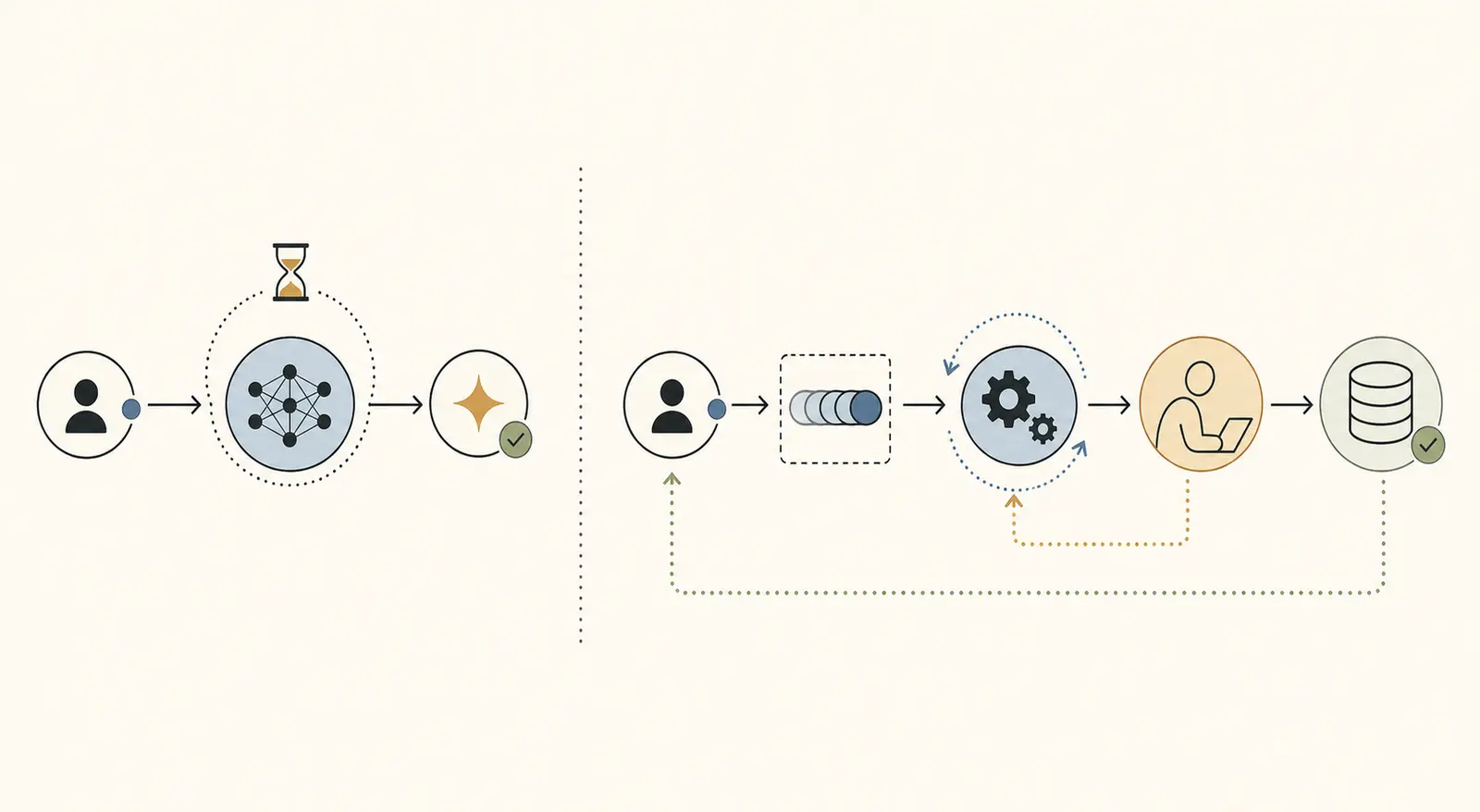
When does synchronous execution win?
Use synchronous execution when the caller needs the result to continue the current interaction, and the workflow's worst credible path fits inside the request timeout with room for retries and small scheduling variation.
The baseline and lower-concurrency cells show the simple case. With 500 ms of model work, no review, and no failures, sync and async had identical measured p50/p95 completion times. Sync cost 42 local units per 40 jobs. Async cost 46 because the fixture charged 0.15 orchestration units per job instead of 0.05.
That does not mean “sync is faster” as a universal law. In this test both forms used the same four execution slots, so the work curve was the same. The useful conclusion is narrower: adding a queue did not buy a better result when the task already fit the request contract.
Choose sync when these conditions are all true:
- The user cannot make a useful next decision without this result.
model p95 + review p95 + retry allowancefits below the request timeout.- The operation has a clear final state if the request fails.
- A retry cannot repeat an irreversible side effect, or the side effect is idempotent.
- The interaction does not need to survive a browser close, worker restart, or handoff to another person.
Streaming can improve the experience for a synchronous response, but it does not change the lifecycle. The request still owns the work until the final result or timeout. HTTP 202 exists for the opposite contract: accepted now, completed later, with a status monitor for the unfinished work (RFC 9110, section 15.3.3).
The principal exception is a short task with a high-consequence side effect. A payment, deletion, or external email may fit inside the timeout and still need a durable idempotency record, approval state, or reconciliation step. Short does not mean safe to hide inside a request.
When does asynchronous execution earn its complexity?
Use asynchronous execution when the workflow can outlive the connection, the user can leave and return, or the system needs durable status, bounded retries, human review, or recovery after worker failure.
The human-review cell made the boundary concrete. A 500 ms model step followed by 3,000 ms of review took 3,500 ms even though the model itself was short. Sync timed out all 40 requests at 2,000 ms. Async exposed a lifecycle and completed all 40. It was slower in absolute batch completion, with p50/p95 of 17,500/35,000 ms, but it did not confuse “the request ended” with “the work failed.”
The same thing happened with a 3,500 ms model and no review. Async did not make the model faster. It made the long operation representable. The user could receive a job ID, see progress, and get a terminal result after the request had ended.
AWS documents this distinction directly in its Lambda invocation model. A synchronous invocation waits for the function response. An asynchronous invocation places the event in a queue and returns a response before the function finishes (AWS Lambda invocation methods). That is an execution contract, not a claim that every workload should use Lambda or a managed queue.
Use async when one or more of these are true:
- The workflow's model, retrieval, tool, or review path can exceed the request timeout.
- A human must review or correct the output later.
- The user needs a history of queued, running, waiting, completed, and failed jobs.
- A worker must retry a transient failure without making the browser hold a connection open.
- A process restart should re-open recoverable work instead of losing it.
- The result is an artifact that can be fetched after completion.
Async is not free. You now own job identity, persistence, status reads, worker leases, retry classification, dead letters, idempotent writes, notifications, and a user experience for waiting. The queue-backed AI workflow guide covers those implementation boundaries. This experiment answers the prior decision: whether taking them on solves a real request-budget problem.
How do failures and retries change the choice?
Retry behavior changes both modes, but it does not erase the crossover. In the 20% transient-failure cell with one retry, sync and async both recovered 95% of jobs and recorded eight repeated model attempts. Sync cost 50 local units; async cost 54. When the task still fit inside the request budget, the queue did not improve recovery in this fixture.
The stress cell was different. It combined a 3,500 ms model, 3,000 ms review, one worker, a 20% failure rate, and one retry. Sync returned 100% timeouts and status quality 0%. Async completed 95%, exposed failed jobs as terminal, and recorded eight repeated attempts. Async still took longer, with p50/p95 of 138,250/267,250 ms, because the single worker serialized long work and review.
The lesson is not “retry asynchronously.” It is “give retries a lifecycle.” AWS Step Functions models retries with error matching, max attempts, and backoff, then uses catchers when retrying no longer makes sense (Step Functions error handling). Google Cloud Tasks exposes the same controls as max attempts, retry duration, and backoff, with a deadline that can make an attempt fail (Cloud Tasks retry configuration).
Use this failure table before choosing a mode:
| Failure or delay | Synchronous default | Asynchronous default |
|---|---|---|
| Short transient provider failure | Retry inside the request if the remaining budget allows | Retry in the worker with a bounded attempt budget |
| Model finishes after request timeout | Return timeout, with a risk of an unknown or repeated request | Keep running or review, then publish a terminal state |
| Human reviewer is unavailable | Timeout or block the current interaction | Keep waiting_for_review, notify, and resume later |
| Worker or process restarts | Lose work unless execution is separately persisted | Requeue after lease expiry or recover from a durable record |
| Side effect may have happened before timeout | Reconcile before retrying | Use an idempotency key and verify the final state |
Queue semantics do not eliminate duplicates. Amazon SQS documents at-least-once delivery and warns that a message can be processed more than once if the visibility timeout expires or delivery is repeated (Amazon SQS visibility timeout). Your worker therefore needs a side-effect boundary that can answer, “Has this job already committed?”
What should the user-visible status contract contain?
Sync can return a final answer directly. Async must return a truthful lifecycle, because 202 only means accepted for processing. The minimum async response is a stable job ID, a status URL or subscription, a current state, an updated timestamp, and a terminal artifact or error when the work ends.
In the experiment, status quality was deliberately simple. A completed or failed sync response scored 1. A timeout scored 0 because the client had no durable state in the synchronous form. Async scored 1 when the job moved through an interpretable queued/running path to completed or failed. That produced 100% status quality for async in every cell and 0% for sync in the over-budget cells.
The status names are less important than their meaning. A useful contract might look like this:
{
  "job_id": "job_123",
  "status": "waiting_for_review",
  "attempt": 1,
  "progress": null,
  "artifact": null,
  "error": null,
  "updated_at": "2026-08-23T12:00:00Z"
}
Do not use completed to mean “the worker stopped.” It should mean that the expected artifact or side effect passed its final-state check. Do not use failed to hide a job that is waiting for a person. Do not expose provider errors as the user's only recovery path.
Provider APIs can expose a similar pattern. OpenAI's current Responses API includes background execution and states such as queued, in_progress, completed, failed, cancelled, and incomplete (OpenAI Responses API reference). That is a useful example of a status vocabulary, not a replacement for your own workflow contract.
How can you run this comparison on your workflow?
Run the smallest honest experiment before building a queue. Keep the business function identical and change only the execution boundary.
- Write the end-to-end path. Include model calls, retrieval, tools, validation, human review, and the final commit. Do not measure only time-to-first-token if the user waits for an approved artifact.
- Set the request budget. Record the actual proxy, gateway, browser, and application timeouts. Use the tightest boundary that can terminate the user-visible request.
- Build two runners. The sync runner returns the workflow result or timeout. The async runner returns a job ID, stores state, and lets a worker resume the same function.
- Freeze the fixture. Use the same task IDs, inputs, model configuration, failure schedule, review delay, retry policy, and concurrency in both runners.
- Record the full trace. Keep enqueue or accept time, attempt starts, provider failures, review start and end, commits, retries, terminal state, and repeated-attempt count.
- Compare success and waiting together. Report p50/p95 terminal time beside success rate, timeout rate, recovery rate, cost, duplicate work, operator interventions, and status quality.
- Move the boundary only when the result changes. If sync meets the user contract, keep it. If it times out, loses recovery, or cannot represent review, pay for async deliberately.
The minimal configuration from this experiment was:
const config = {
  tasks: 40,
  durationMs: [500, 3500],
  concurrency: [1, 4],
  failureRate: [0, 0.2],
  reviewDelayMs: [0, 3000],
  maxAttempts: [1, 2],
  syncTimeoutMs: 2000,
  retryBackoffMs: 250
};
For a real model-backed run, add model identifier, prompt version, tool schemas, provider timeout, input and output tokens, price formula, and redaction policy. The local fixture measures architecture behavior. It does not measure model quality or production cost.
What is the practical crossover rule?
Start synchronous when model p95 + review p95 + retry allowance is comfortably below the request timeout and the caller needs the answer now. Move to asynchronous when that sum can exceed the timeout, when a human may return later, or when the user needs a durable state after the connection ends.
The experiment gives that rule one explicit boundary. With a 2,000 ms request budget, 500 ms of model work plus 0 ms review stayed inside it and sync matched async. The same 500 ms plus 3,000 ms review exceeded it, and so did 3,500 ms of model work alone. In both over-budget cells, sync timed out 100% of jobs while async completed 100%.
That is not a universal latency threshold. It is a testable starting point. Measure your workflow's actual tail, add the human and retry path, and inspect what the user sees after the request ends. If the answer is “nothing reliable,” the queue has earned its complexity.
If you are deciding whether this workflow belongs in an agent architecture, start with the AI agent decision guide. If you already know the workflow must be durable, use How to Build a Queue-Backed AI Workflow for the job record, lease, retry, and dead-letter implementation. The article is complete without either next step.
Continue with a related field note
- How Many LLM Calls Should an AI Workflow Use?
- When Should an AI Workflow Own a Decision Versus Prepare One?
- When Should an AI Workflow Have a Separate Policy Layer?
- When Should an AI Workflow Split Extraction From Decision Support?
- How to Choose AI Architecture When the Workflow Changes by Team
- How to Map Decision Boundaries Before Designing an AI Workflow
Questions people ask next
Does streaming make a synchronous AI workflow asynchronous?
No. Streaming changes how partial output reaches the client. The workflow is still synchronous if the request owns the execution until a final result or timeout. Use a durable job status when the work must continue after the connection ends.
Is a queue enough to make an AI workflow reliable?
No. A queue gives the work an identity and a place to wait. Reliability still needs bounded retries, visibility or lease timeouts, idempotent side effects, terminal failure handling, and a status contract the user can understand.
Does human review automatically require asynchronous execution?
No. A fast review can fit inside a synchronous request, although it may still be a poor interaction. Async becomes the safer default when review delay can exceed the request budget or the reviewer needs to return later.